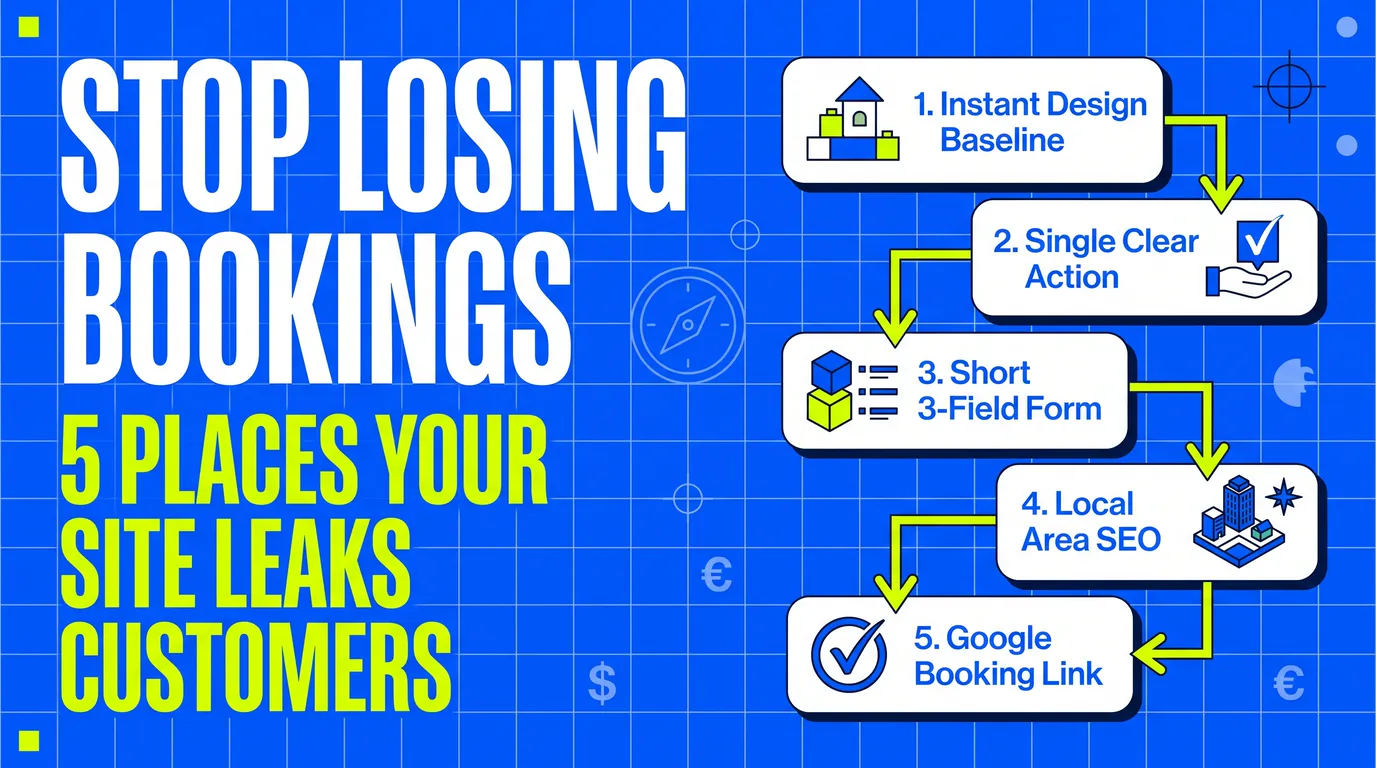
Seven years in design. Four of them building websites for small businesses — laundries, detailers, barbers, cleaners, removals firms. In that time one pattern has repeated more than any other:
The business isn't losing customers at the booking form. It's losing them long before anyone gets there.
Owners usually assume the problem is traffic. Not enough people are finding the site. Sometimes that's true. More often the visitors arrive, look around for a few seconds and leave — and nothing in the business ever records that it happened. No enquiry, no missed call, no abandoned form. Just silence that looks like "nobody's searching."
Here are the five places it goes wrong, roughly in the order customers hit them.
1. The site looks wrong, and they decide in seconds
People spend hours a day on well-built websites. Banking apps, delivery services, marketplaces — all designed by large teams, all consistent, all fast. That's the baseline now, and it applies to everyone. Older customers included; the assumption that they're forgiving of a rough website hasn't been true for years.
So when someone lands on a small business site where the text is misaligned, the logo is stretched, the buttons sit at different sizes and the mobile layout is a squeezed version of the desktop one, they don't think "this is a small business doing its best." They think something is off. Often they couldn't tell you what. They just leave.
This is the harshest part of the whole funnel, because it happens before your prices, your reviews or your work are ever seen. The judgement gets made on the design and nothing else.
What to change: consistent spacing, one type scale, one button style, images that aren't stretched, and a mobile layout designed for mobile rather than shrunk down. None of that is decoration. It's the thing standing between a visitor and everything else you have to offer.
2. There's no obvious next step
A visitor should never have to work out what to do. On every screen, at every scroll position, there should be one clear action — book, request a quote, message.
What usually happens instead: a phone number in the header, a contact form somewhere at the bottom, a "get in touch" link in the menu and a WhatsApp icon floating in the corner. Four options, none of them obvious, all competing. Faced with four doors, a lot of people pick none.
What to change: decide on the single action you want most and make it the same action everywhere — same wording, same placement. Label it with what happens next rather than with the tool. "Book a slot" or "Get a quote" beats "Contact."
3. The booking form asks for too much
This is where the most visible money leaks. A form asking for full name, email, phone, address, postcode, service type, preferred date, alternative date, property size and "how did you hear about us" will be abandoned by most of the people who start it.
Every field costs you completions. The published research disagrees on exactly how much, and at least one well-known test found that rewriting the labels beat cutting the fields — so treat any specific percentage with suspicion. The direction is consistent though, and three fields is the usual working target: who they are, how to reach them, and what they need.
The instinct behind the long form is understandable. You want enough detail to quote accurately. But you don't need all of it in the form. You need enough to make contact and give a rough number. The rest belongs in the follow-up call, which is also where you build trust and close.
What to change: cut the form to the minimum you need in order to quote. Everything else goes on the call. If a field exists because it's occasionally useful, delete it.
4. They can't find you in the first place
All of the above assumes someone reached your website. Often nobody did.
When a customer searches for your service in your area, they pick from the first few results. If your business isn't there, the quality of your site is irrelevant. And a lot of UK small businesses have never done the basics: a page for each service, a page for each town or postcode you cover, a business name and address that match everywhere online, and a Google Business Profile that's actually filled in.
Local search is winnable in a way national search isn't. You aren't competing with the whole internet — you're competing with the handful of businesses working the same postcodes. That's the difference between a page for removals firms in one town and a page trying to rank for "removals" nationally.
What to change: a page per service, a page per area, details that match across every listing, and a complete Google Business Profile. Unglamorous, and it moves more than anything else on this list.
5. Your Google Business Profile has no way to book
This one takes ten minutes and most businesses never do it.
A large share of customers never reach your website at all. They find you in Google Maps or the local results, look at the photos and the reviews, and decide there. If the only thing on that profile is a phone number, you're limited to whoever is willing to ring you.
Fewer of them are than you'd think. In GetApp's 2024 scheduling survey, 67% of consumers said they'd rather book online than call, email or walk in — up from 56% in 2021. The same research puts roughly 40% of online bookings outside business hours, when nobody would answer the phone anyway. If your profile can't be actioned at nine on a Sunday evening, those people go to whoever's can.
What to change: add both your website link and a direct booking or quote link to your Google Business Profile. Point the booking link at your booking page specifically, not your homepage — every extra click loses people.
Where to start
If you fix one thing this week, make it the booking link on your Google Business Profile. Ten minutes, and it catches people who were already looking for you.
If you fix one thing this month, cut your booking form down. It's the cheapest change with the most direct effect on the number of jobs you book.
And if the site itself is the problem — if it looks wrong and no amount of tinkering fixes it — that's a rebuild, not a repair. That's a bigger conversation, but an honest one.
It's also the one we have most often. You can see how we work with UK small businesses, or read why our sites carry no upfront cost — we build it first, you look at it live, and you decide after that.